

Prerequisites
Before configuring MovoSuite, make sure the following are in place.
1. Contributor rights to an Azure subscription or resource group
Section titled “1. Contributor rights to an Azure subscription or resource group”You need at least Contributor rights to an Azure subscription, or to a resource group within one, to deploy and operate MovoSuite.
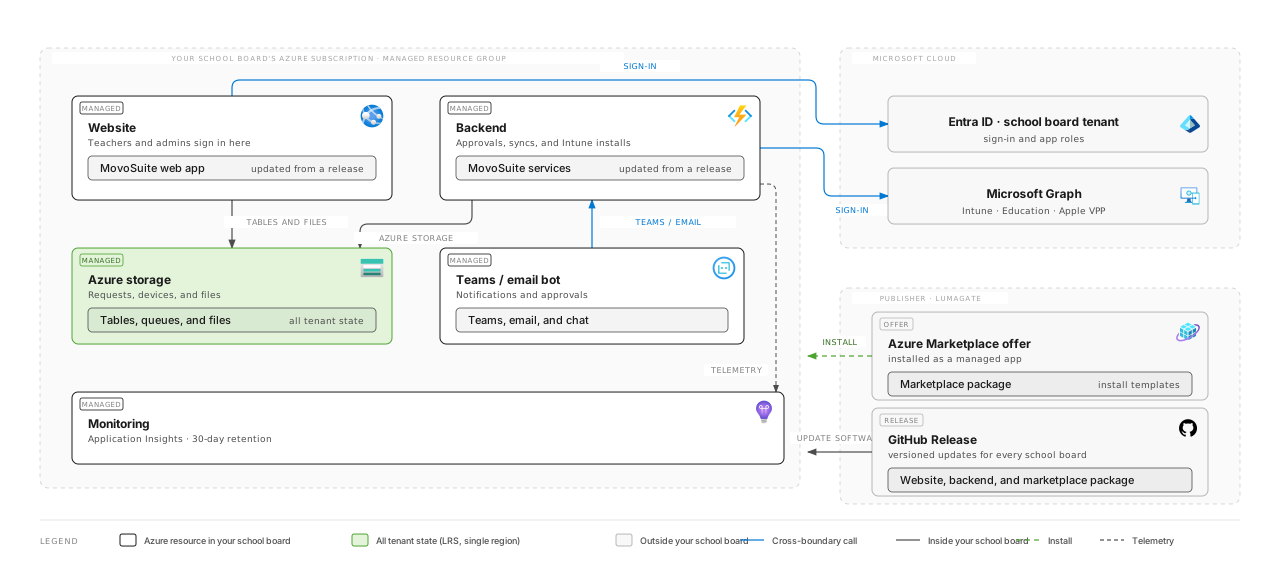
MovoSuite installs as a managed application into that subscription — one resource group holding a Function App, a Web App, a storage account, an Azure Bot and monitoring:
2. Access to a Global Administrator account
Section titled “2. Access to a Global Administrator account”A Global Administrator account is used to authorize MovoSuite for deployment and notification actions, and to approve the Office 365 Provider ID.
If you don’t have a Global Administrator account, you’ll need accounts that can, at minimum:
- Consent to an application for delegated and application permissions. See Microsoft’s guidance on creating a custom role to grant tenant-wide admin consent.
- Hold the Exchange Administrator role, to approve the Provider / Provider ID.
3. Intune with DEP and VPP integrated
Section titled “3. Intune with DEP and VPP integrated”MovoSuite builds on native Intune functionality, so Intune must be deployed and integrated with your Apple Device Enrollment Program (DEP) and Volume Purchase Program (VPP). MovoSuite supports unlimited VPP tokens, up to the Intune maximum.
4. An Exchange Online mailbox for sending notifications
Section titled “4. An Exchange Online mailbox for sending notifications”Create a mailbox MovoSuite will send email notifications from. It must be a:
- User Mailbox (requires an account with an Exchange Online license), or
- Shared Mailbox (no license required).
It cannot be an Office 365 Group mailbox — Microsoft Graph doesn’t support sending as a Group mailbox today.
5. An address for receiving notifications and requests
Section titled “5. An address for receiving notifications and requests”Identify an address to receive notifications and approval requests. Ideally this is an Office 365 Group whose members are subscribed to its emails, so that Actionable (live) emails render correctly.
Once these are in place, continue to the Setup checklist.